The NU Admit Card for Honours Admission 2025-2026 is available for download from April 11 to April 24, 2026. Only college-confirmed applicants can access it through the official portal at www.nu.ac.bd/admissions. Your admit card is your entry pass to the exam hall. Without a printed copy, you will not be allowed inside.
ভর্তি পরীক্ষার প্রবেশপত্র নিয়ে নতুন নোটিশ:
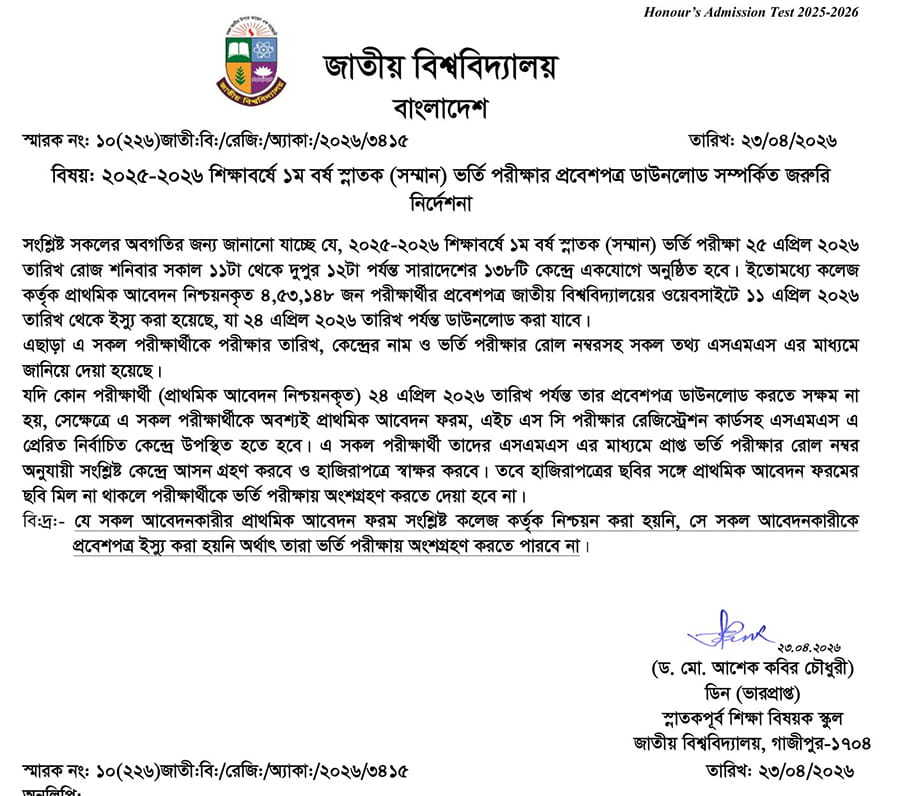
প্রাথমিক আবেদন নিশ্চয়নকৃত ৪,৫৩,১৪৮ জন পরীক্ষার্থীর প্রবেশপত্র জাতীয় ওয়েবসাইটে থেকে ২৪ এপ্রিল ২০২৬ তারিখ পর্যন্ত ডাউনলোড করা যাবে।
যদি কোন পরীক্ষার্থী (প্রাথমিক আবেদন নিশ্চয়নকৃত) তার প্রবেশপত্র ডাউনলোড করতে সক্ষম না হয়, সেক্ষেত্রে এ সকল পরীক্ষার্থীকে অবশ্যই প্রাথমিক আবেদন ফরম, এইচ এস সি পরীক্ষার রেজিস্ট্রেশন কার্ডসহ এসএমএস এ প্রেরিত নির্বাচিত কেন্দ্রে উপস্থিত হতে হবে।
National University Admit Card 2026
Not every applicant is automatically eligible to download. You can download your admit card only if your college has officially confirmed your application.
If you submitted your form and fee but never received college confirmation, contact your college immediately. An unconfirmed application has no admit card — and no path to the exam.
How to Download NU Admit Card 2026?
Follow these exact steps to download your admit card without errors:
- Open your browser and go to www.nu.ac.bd/admissions
- Click on “Applicant Login (Honours Login)” from the menu
- Alternatively, go to Honours Tab → Admit Card Download
- Enter your Application ID in the first field
- Enter your PIN in the second field
- Click “Submit” to access your admit card
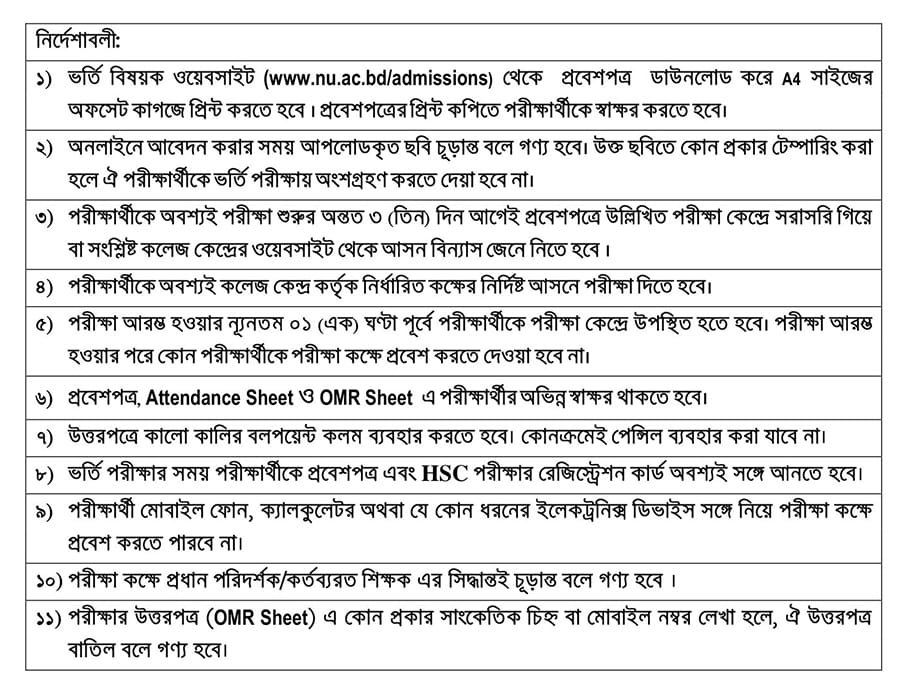
- Download the PDF and print it on plain white A4 paper in color
- Check every detail carefully before leaving the page
Print at least two copies — keep one safe at home and carry one to the exam
I can’t download admit card. What to do?
If you cannot download the NU admit card, first confirm that your application was approved by the college. If it was approved, try again later using the correct Applicant ID and PIN. If you still fail by 24 April 2026, go to your exam center with your signed application copy, original HSC registration card, and the SMS sent by NU.
- Your signed application form copy.
- Your original HSC registration card.
- The SMS sent to your mobile that contains your admission test roll number and center-related information.
What to Do If You Forgot Your PIN
This is the most common problem students face. Your PIN was sent to your registered mobile number via SMS at the time of application. Here is how to recover it:
Step 1 — Check your SMS inbox first:
Search for messages from NU or 16222 received between November 2025 and February 2026. NU also sends an SMS with a direct download link when the admit card is published — check your inbox carefully.
Step 2 — Recover from nu.ac.bd/admissions
If you forget your PIN, use the “Recover” option with your mobile number.
Step 3 — Email the official NU helpdesk:
If your college cannot help, email [email protected] directly. Include your Application ID, SSC roll number, and HSC roll number in the email. Act quickly — the deadline is April 24.
NU Admission Test Marks Distribution
Your admit card gets you into the exam hall — here is what you are being evaluated on:
| Component | Marks |
|---|---|
| MCQ Admission Test | 100 marks |
| SSC GPA × 8 | Max 40 marks |
| HSC GPA × 12 | Max 60 marks |
| Total | 200 marks |
| MCQ Pass Mark | Minimum 35 |
No negative marking applies. Attempt every question. For the complete exam pattern and GPA conversion formula, read our full [NU Admission 2025-2026 Guide].
Exam Day Instructions
Arriving prepared avoids last-minute panic. Follow these instructions carefully on April 25, 2026:
What to bring:
- ✅ Printed admit card
- ✅ HSC Registration Card (original)
- ✅ Black ballpoint pen
- ✅ Arrive at the center by 10:15 AM — the exam starts at 11:00 AM sharp
What is strictly prohibited:
- ❌ Mobile phones or any electronic devices
- ❌ Calculators or smartwatches
- ❌ Books, notes, or any written material
- ❌ Bluetooth devices of any kind
NU Honours Exam Seat Plan 2026
There is no separate seat plan published for the NU Honours Admission Test. Your exam center, hall room, and seat details are printed directly on your downloaded admit card.
You can also search your exam center using your Application ID through the National University admission website. Centers paste the seat plan on their notice boards 1-2 days before the exam — arrive early to locate your room.
Students cannot request a center transfer under any circumstances. Whatever center is printed on your admit card is your fixed venue.
Conclusion
Download your admit card today — do not wait until April 24. Print two color copies, verify every detail carefully, and keep your HSC Registration Card ready alongside it. Walk into the exam center on April 25, 2026 at 10:15 AM with your black pen, your printed admit card, and your full preparation behind you.